SentinelForge Security – Windows Antivirus & Ransomware Protection
Complete antivirus software and virus protection for Windows PCs — real-time antivirus scanning, ransomware defense, malware detection, smart file scanning, USB drive protection, quarantine management, and cloud reputation intelligence. All from one centralized dashboard.
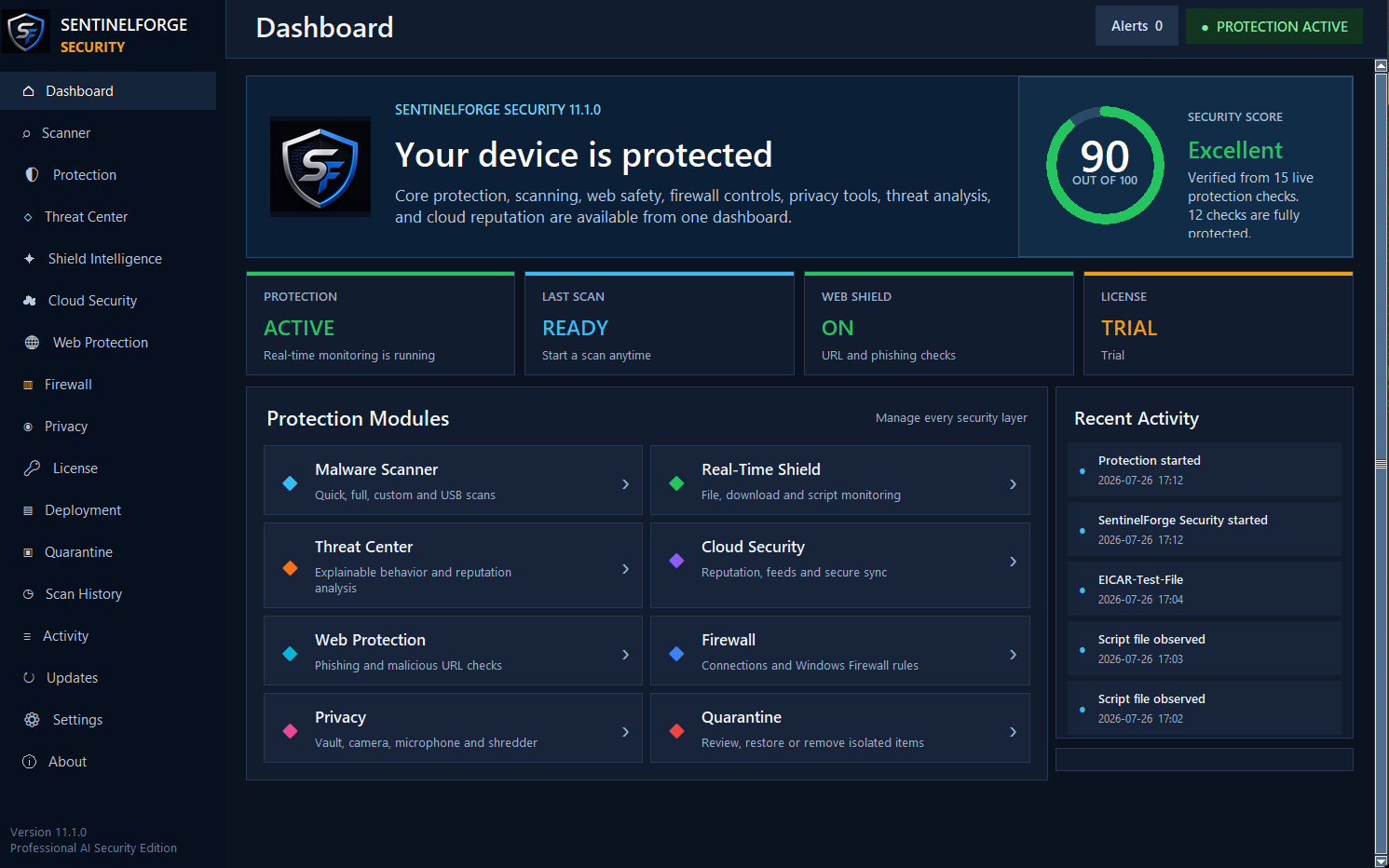
Antivirus Protection That Works Together.
SentinelForge combines real-time malware scanning, behavioral threat detection, and forensic analysis into a single Windows antivirus application — so you can detect threats, understand your security posture, and respond with confidence.
Designed to Detect Threats
The Shield Intelligence™ Engine combines behavioral monitoring, reputation analysis, and traditional malware scanning to help identify suspicious activity. It evaluates system events collectively to surface meaningful security insights.
Monitor Network Activity
SentinelForge helps monitor network connections and flag unusual activity that may indicate a threat. Designed to give you visibility into what is communicating on your system.
Quarantine & Recovery
Suspicious files are isolated automatically and stored in a managed quarantine. Review, restore, or permanently remove items from a single interface.
Understand Your Security Score
The Security DNA™ Score provides an overall assessment of your device's security configuration, helping you identify settings that may need attention.
Threat Replay™ Forensics
When an event is flagged, Threat Replay™ presents a chronological timeline of relevant activity — helping you understand what happened without sorting through raw logs.
Everything You Need to Protect Your Windows PC.
SentinelForge Security is antivirus software for Windows 7, 8, 10, and 11 that delivers nine layers of virus protection — from real-time malware scanning to ransomware defense, USB protection, and cloud-backed threat intelligence — all managed from one dashboard.
Scans files, processes, and memory for known and emerging virus threats on Windows PCs.
Detects trojans, spyware, adware, and other malicious software before they can cause damage.
Monitors for encryption-based attacks and blocks ransomware from locking your files.
Continuously monitors system activity and blocks threats the moment they appear.
Intelligent scanning engine prioritizes high-risk files and locations to minimize system impact.
Automatically scans removable drives when connected to help reduce USB-borne malware risk.
Isolates suspicious files safely and lets you review, restore, or permanently remove them.
Cross-references files against a cloud threat database for up-to-the-minute detection accuracy.
A complete security dashboard for supported 64-bit Windows 10 and Windows 11 systems — no hardware appliance required.
PROTECTION SOLUTIONS
No Excuse to Be Exposed.
Whether you're protecting one Windows PC or a fleet of workstations — there's a tier built for your needs. Pick yours and deploy in minutes.
- Malware scanning & removal
- Real-time file monitoring
- Quarantine management
- Security event dashboard
- Email support
- Everything in Home Basic
- Multi-device dashboard
- Scheduled scan management
- Security posture scoring
- Email support
- Everything in Home Family
- Behavioral threat analysis
- Threat Replay™ forensics
- Security DNA™ scoring
- Phone & email support
- Everything in Home Premium
- Multi-device management console
- Device policy controls
- Security event logs
- Priority support
- Everything in Professional
- Admin policy management
- Compliance reporting tools
- Security posture dashboard
- Priority support
- Everything in Business
- Multi-site deployment
- Advanced reporting suite
- Security event correlation
- Priority support
- Everything in Commercial
- Custom deployment options
- Dedicated onboarding
- Direct support contact
- SLA-backed response times
All plans include a 30-Day Money-Back Guarantee on first-time purchases. Enterprise pricing is tailored — contact sales for a custom quote.
Real People. Real Protection.
From families protecting home computers to small businesses securing their teams — here's what SentinelForge customers are saying.
I bought this for my home PC after getting a virus last year. Setup took maybe 10 minutes and I haven't had a problem since. It just runs quietly in the background.
My kids use our family computers for school and I was always worried about what they might accidentally download. SentinelForge caught something on my daughter's laptop within the first week.
I work from home and needed something I could trust on my personal machine. It's been running for three months without slowing anything down. Does what it says.
Honestly I'm not very tech-savvy but this was easy to install. I got an alert once, clicked quarantine, and it handled it. That's all I needed.
We run a small accounting office with 8 computers. SentinelForge lets me see all of them from one screen. It's straightforward and the price is fair for what you get.
We had a ransomware scare at our last provider. Switched to SentinelForge for our 12 workstations and the setup was smooth. The dashboard gives us peace of mind without needing a full IT team.
Real Deployments. Practical Results.
Small IT Team Gains Centralized Visibility Across 40 Workstations
A professional services firm with a two-person IT team was managing security across 40 Windows workstations using separate tools with no unified view.
Deployed SentinelForge Professional across all 40 workstations. The centralized console and Security DNA scoring gave the team a single dashboard to monitor device health and review security events.
Independent Practice Simplifies Security Reporting for Compliance Reviews
A small healthcare practice needed clearer documentation of security events and device status to support internal compliance reviews without a dedicated security team.
SentinelForge Home Premium deployed across 5 workstations. Threat Replay forensics and on-demand security reports gave the practice manager clear records of all flagged activity.
Why Choose SentinelForge Security?
Security software doesn't have to be complicated. SentinelForge is built for everyday Windows users — straightforward to install, easy to understand, and designed to work quietly in the background while you get on with your day.
Real-Time Protection
SentinelForge watches your system continuously — not just during scheduled scans. When a file is opened, a program runs, or a USB drive is plugged in, the engine evaluates it immediately. You don't have to remember to run a scan; protection is always on.
Malware Scanning
The scanner checks files, downloads, and running processes against known malware signatures and behavioral patterns. It looks for viruses, trojans, spyware, adware, worms, and other unwanted software — then flags or quarantines anything suspicious so you can decide what to do next.
Ransomware Defense
Ransomware tries to lock your files and demand payment to get them back. SentinelForge monitors for the kind of rapid, bulk file changes that ransomware causes and can intervene before the damage spreads. No security software can guarantee it will catch every attack, but having a behavioral layer watching for these patterns adds a meaningful line of defense.
USB Drive Protection
USB drives are a common way for malware to move between computers. When you plug in a flash drive or external device, SentinelForge scans it automatically before any files can run. This is especially useful in households or offices where drives are shared between multiple people.
Quarantine Management
When a suspicious file is found, it's moved to a secure quarantine area where it can't affect the rest of your system. You can review quarantined items at any time, restore files that were flagged by mistake, or permanently delete threats you're confident about — all from one simple screen.
Cloud Reputation Intelligence
Some threats are too new to be in any local database. SentinelForge checks file reputation against cloud-based intelligence to help identify recently discovered malware that hasn't yet been added to traditional signature lists. This helps the scanner stay relevant even as new threats emerge.
Security Monitoring
The Security DNA™ dashboard gives you a plain-language view of your device's security status — what's been scanned, what was found, and whether any settings need attention. You don't need a technical background to understand what's happening on your own computer.
Designed to Stay Out of Your Way
SentinelForge is built to run quietly without slowing your computer down during everyday tasks. Intensive scanning is scheduled for times when your PC is idle, so you're less likely to notice it running in the background.
Windows Compatibility
SentinelForge Security supports 64-bit editions of Windows 10 and Windows 11. For the best security and compatibility, keep Windows updated with the latest available patches. The installer is a single download and walks you through setup step by step.
How to Install SentinelForge
- 1Choose a plan on the Pricing page and complete your purchase securely through Stripe.
- 2You'll receive a confirmation email with your license key. Check your spam folder if it doesn't arrive within a few minutes.
- 3Visit the Download page, sign in to your account, and download the Windows installer.
- 4Run the installer and follow the on-screen prompts. The whole process typically takes under five minutes.
- 5Enter your license key when prompted. SentinelForge will activate and begin protecting your PC immediately.
License Activation
Each license key is tied to a specific plan and covers the number of devices listed on that plan. You can activate your key on any supported Windows PC — just enter it during installation or from the Settings screen inside the app.
If you need to move your license to a different computer, you can deactivate it from your account dashboard and reactivate it on the new machine. Your subscription and license history are always available in your account.
SentinelForge requires an internet connection to activate and to check for updates, but continues to provide protection during short periods of offline use.
Secure Purchasing
All purchases are processed through Stripe, one of the most widely used payment platforms in the world. SentinelForge never stores your card details — payment information goes directly to Stripe's secure servers and is never handled by our systems.
Subscriptions renew automatically at the end of each billing period. You'll receive an email reminder before renewal. You can manage or cancel your subscription at any time by contacting support.
First-time purchases are covered by a 30-day money-back guarantee. If you're not satisfied, contact us within 30 days of your first purchase for a full refund.
Customer Support
If you run into a problem — whether it's a billing question, a license issue, or a technical concern — you can reach the SentinelForge support team through the Contact page. We aim to respond to all inquiries within one business day.
Existing customers can also manage their subscription, view license keys, and access download links directly from the account dashboard after signing in.
Your Privacy
SentinelForge collects only the information needed to provide the service — your account details, license status, and anonymized telemetry used to improve detection. We do not sell your personal data to third parties, and we do not use your files or browsing activity for advertising purposes.
Cloud reputation checks send a file hash (a short fingerprint) — not the file itself — to our servers. This means your documents, photos, and personal files never leave your computer. Full details are in our Privacy Policy.
Frequently Asked Questions
Will SentinelForge slow down my computer?
SentinelForge is designed to run with a light footprint. Background monitoring uses minimal resources, and heavier scans are scheduled for idle periods. Most users don't notice it running.
Can I use one license on multiple PCs?
It depends on your plan. Home Basic covers 1 PC, Family covers up to 3, and higher plans cover more devices. The number of covered devices is shown clearly on the Pricing page.
Does SentinelForge guarantee it will catch every threat?
No security software can make that guarantee — and any product that does should be treated with skepticism. SentinelForge uses multiple detection layers to help identify a wide range of threats, but no tool is infallible. Keeping Windows updated and practicing safe browsing habits remains important.
What happens when my subscription renews?
Your subscription renews automatically at the end of each billing period. You'll receive an email reminder beforehand. If you don't want to renew, contact support before the renewal date.
Can I get a refund if I change my mind?
First-time purchases are covered by a 30-day money-back guarantee. Renewal charges are generally non-refundable. See the full Refund Policy for details.
Is my payment information stored by SentinelForge?
No. All payments are handled by Stripe. SentinelForge never sees or stores your card number — only a billing reference is kept for subscription management.
What if I need to move my license to a new PC?
Sign in to your account dashboard, deactivate the license on the old machine, then activate it on the new one. If you run into trouble, contact support and we'll sort it out.
Which Windows versions does SentinelForge support?
SentinelForge supports 64-bit editions of Windows 10 and Windows 11. Keep Windows updated with the latest available patches for the best compatibility and security.
More questions? Visit the full FAQ page, explore our Windows antivirus software page, or contact support.
30-Day Money-Back Guarantee
First-time purchases only. No questions asked.
Stripe-Secured Checkout
Your card details are never stored by SentinelForge.
Account Dashboard
Manage licenses, downloads, and billing in one place.
PROTECT YOUR WINDOWS DEVICES.
SentinelForge Security installs in minutes on supported 64-bit Windows 10 and Windows 11 systems. Antivirus, ransomware defense, real-time protection, smart file scanning, USB protection, quarantine management, and cloud reputation intelligence — all in one download.